
organize better… present better…Do better.
Do better than others
Run your studio like the big ones.
StudioDesk Ops keeps projects, payments and paperwork together – so you always know what's paid, what's next, and who owns it.
Free for 90 days · No card needed · Free forever for Creators
Join us on Discord
Sound familiar?
Was that the first payment, a part payment, or the final one?
Creative work moves fast. Briefs in chat, invoices in folders, payments in your bank app, revisions everywhere. StudioDesk Ops puts it all on one desk – and it stays on your computer.

Everything on one desk
Built for client-facing creative work
Designers, video editors, social creatives, brand managers, freelancers and small studios.
Projects & tasks
Every job with its due dates, revisions, files and who's on it. See what's next at a glance.
Clients
Contacts, history, emails and every project for each client – no more digging through chats.
Paperwork with your logo
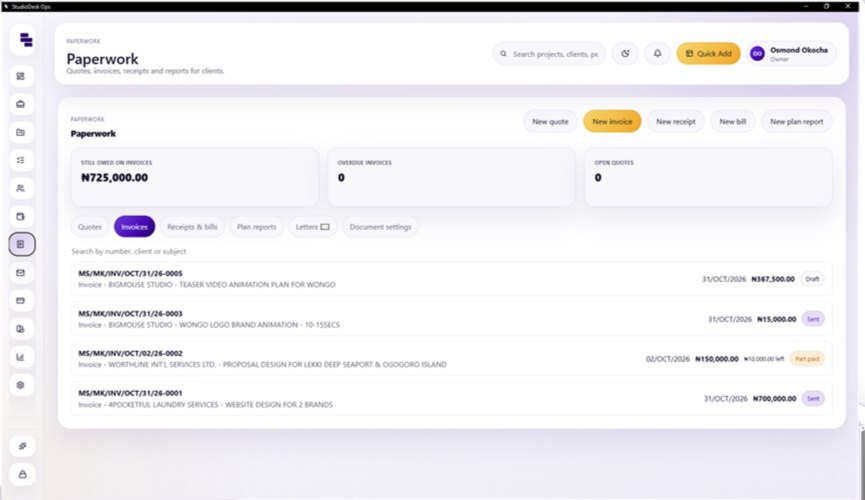
Quotes, invoices, receipts and letters that look professional – sent straight from your Gmail.
Payments & funds
Part payments, balances and where every payment goes – so follow-ups are never awkward.
Your team & payouts
Assign work to staff and freelancers. Each person sees their own tasks and what they've earned.
Private & backed up
Your studio's data stays on your PC. Locked backups you can restore on a new computer.
See it in action
Quick to learn. Quicker to use.
Add a client in seconds. Create a project without leaving your flow.
Adding a client
Creating a project
Simple pricing
One price for your whole studio
Not per person, not per computer.
1 month
- Everything in StudioDesk
- Your whole team
- Free updates
3 months
- Everything in StudioDesk
- Your whole team
- Free updates
12 months
- Everything in StudioDesk
- Your whole team
- Free updates
Pay by card in the app (secure checkout by Flutterwave), or by bank transfer.
Free for Creators
Free while you work for a studio. Paid when you run one.
Freelancers and team members use StudioDesk free – forever. See your tasks, share your work, chat with the studio and track what you've earned.
- A studio adds you and sends an invite code by email.
- Download StudioDesk and choose I was invited. No code? Choose free Creator.
- Try running your own clients: 1 client + 3 documents free.
- Ready for your own studio? Start my studio – the first 90 days are free.
Creator Free forever
Your tasks from every studio that invited you, uploads, status updates, studio chat, My Pay and your own to-do list.
The taste Once
1 client and 3 documents (quotes, invoices, receipts or letters) in your first 90 days.
Studio From ₦5,000/mo
Your own clients, all paperwork, invite your team, finance, funds, plans and reports. 90 days free to start.
Studios: when someone you invited starts paying, you get a free month (up to 10 a year).

Get StudioDesk Ops
For Windows 10 and 11 (64-bit). Free for 90 days – free forever for Creators.
Download for WindowsGot an invite code? When StudioDesk opens, choose I was invited and type it in.
Questions or ideas? Join the community on Discord.
Where is my studio's data kept?
On your own computer. StudioDesk only checks your license online – it sends an install ID, an anonymous PC ID, the app version and your studio name. Never your clients, projects or money. If you invite someone, their name and email are used to make their invite code. Team chat messages and the files you share in it (photos, voice notes, documents up to 25 MB) travel through StudioDesk Cloud and are deleted from it after 30 days.
Do I need the internet?
Only now and then, so StudioDesk can check your license and updates. You can work offline for up to 7 days at a time.
How do I pay?
Inside the app, under Settings → License → Plans & pricing. Pay by card through Flutterwave's secure checkout and StudioDesk switches on by itself. Prefer a bank transfer? Email us.
I'm outside Nigeria. What will I pay?
Prices are set in NGN. We show an estimate in your currency – your bank or card provider confirms the final converted amount.
What happens after the 90 days?
Choose a plan to keep going. If you only work for other studios, switch to a free Creator instead.
Will I get updates?
Yes. StudioDesk tells you when an update is ready, saves a safety backup, then installs it in a click.
Can I move to a new computer?
Yes. Save a backup, install StudioDesk on the new PC and choose “I'm an existing user” to restore it. Your license moves with it.